The Dribbble of 2019

Screen Shot 2019-11-03 at 11.47.10 AM.png

Dribbble is where designers post their work (also called a “shot”) to gain exposure, get feedback and potential nab a job.

I saw the founders of Dribbble talk about their platform several years ago. They talked about helping people get constructive criticism while deciding on which direction to take their work and emphasized the posts that were in the sketch-phase. That Dribbble is no longer in existence.

Today, it’s a place where designers post polished work that is often the end result of many hours of pixel pushing. This high fidelity work is beautiful, and the beauty of everyone’s work has ultimately transformed the platform into a fashion show that’s more eye candy than thoughtful user experiences.

Moreover, designers are starting to use Dribbble as a reference for an aesthetic that you should follow. Highly large radii on card layouts, parallax motion, spring interactions, rounded sans serifs, huge colored drop shadows high on blur, the same glowing chart that is measuring wealth? fitness? brightness? They are everywhere.

There’s many, many UIs that appear clean, because they only use icons. But on closer inspection, you realize that you don’t know what any of the icons do. There are endless onboarding tutorials that are beautifully laid out, except that nobody – I mean nobody – reads onboarding tutorials that are three screen long. There are gorgeous text fields where the outline and suggestion text is so faint it would never pass an accessibility test.  Design is more than pretty images. Design is about usability, function and intent.

As a designer, Dribbble is fantastic for getting visual inspiration for your next app design or ideas for micro-interactions that are fluid and unique. As an employer, it tells you how good someone is with a software program that they could have just learned a week ago and how well they can copy a style. If you want to look for real design, look to the real world – ask people what they are doing, how they do it and what their habits are to developing success in their field. I promise, there’s good stuff.
A Few Habit-Building Apps That Actually Work

Every couple of months or so, I start a new project and wonder why it doesn’t get done. I decided I wanted to make project-creation a habit-related task that I could do every day. Since, I live and breathe apps as a mobile UI designer, I decided to test out some apps that could potentially help me with my problem.

My goal was to find an app that could actually help motivate me to do the task rather than make it a chore. I downloaded 5 habit-building apps that seemed legit, and created a couple of practice tasks that I could use for my experiment.

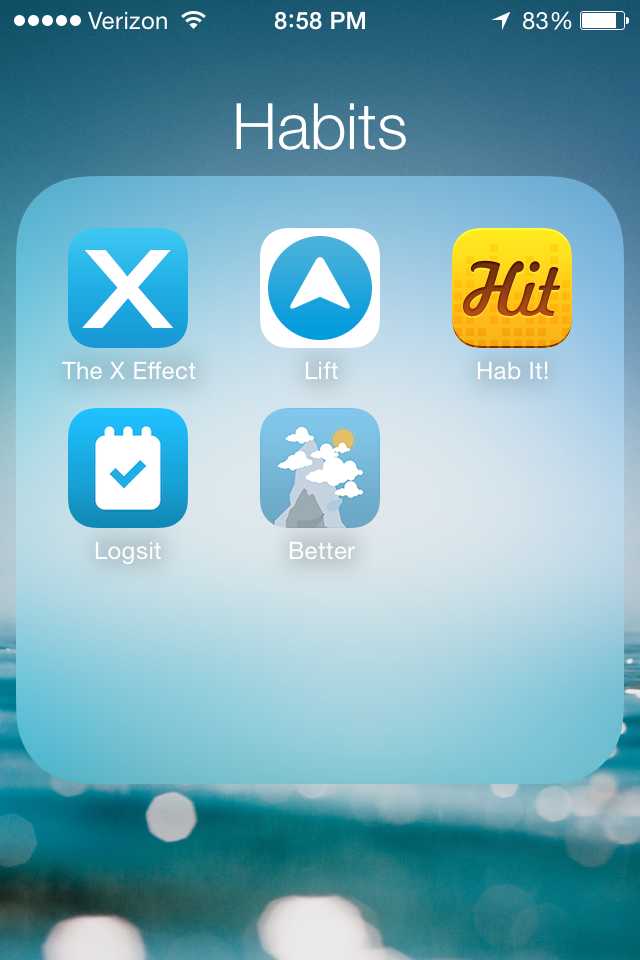
The apps were: The X Effect, Lift, Hit It, Logsit and Better.

Photo Jun 08, 8 58 18 PM

Let’s start with the first one: The X Effect.

Photo Jun 08, 8 58 35 PM

The idea is to hit a square when you’ve complete your daily task, which you’re going to do for 49 days in order to make it a habit. The number of days needed to actually create a habit changes from person to person (and task). It felt really satisfying to see a bold X over the day. If it had audio, it would have made a “BOOM” sound every time I tapped a square.

Next: Lift

Photo Jun 08, 8 59 44 PM

Lift works like this: you swipe right whenever you’ve completed your task, which takes you to another screen where you can make notes about how it went for the day, see your weekly stats, share it, etc. It’s much more feature heavy and for people who want to note their progress in detail. I didn’t find this very useful, since I just wanted to mark that I had finished my tasks. If this app had audio, I would imagine a “swoosh” sound. I want BOOM.

Next: Hit it (can’t find link)

Photo Jun 08, 8 59 57 PM

Hit it was pretty cool. You could see how many days in a row you had done your tasks. You can keep track of good tasks and bad tasks that you want to kick. Similar to The X Effect without the aggression.

Next: Logsit

Photo Jun 08, 9 00 40 PM

Logsit keeps track of the last time you did something. You swipe right to check in. It’s such a general app that it’s not really effective as a habit-building program. You can use it for a lot of other things though like figuring out the last time you went to the dentist.

Last but not least: Better Every Time

Photo Jun 08, 9 01 06 PM

Better? How about best. When you go to log a task, you open the app, and it moves you up a mountain. The visuals are beautiful. The more times you do the task, the higher you climb. The scenery changes with every task completion. You can also take a photo/keep a note of how your task went.

Overall: I stuck with The X Effect and Better Every Time as I progressed through my experiment. (I did in fact practice Spanish using Duolingo and scales every day for three weeks.) I learned that visuals are really important (for me), and that I want to feel a strong sense of completion when I went to log the tasks. Better Every Time is amazing in that it actually takes you on a journey. You don’t know if the road ahead leads to a dark forest or a beautiful clearing… but you’re going to find out.